AI Foundations, Part 5: Tools Are What Make It More Than a Chatbot
Text in, text out is a parlor trick. Give the model tools — the ability to read a file, call an API, search the web — and it becomes something that can actually act.
Strip a model down to just text in, text out, and it’s a very good essay generator. Nothing more. The moment it can act on the world — read a real file, hit a real API, run a real command — the category changes entirely.
That’s what a tool is.

What a tool actually is
A tool is a capability that extends what the model can do beyond generating text. Without tools, it can only read what you hand it and write something back. With tools, it can:
- Read files from a real filesystem
- Execute shell commands
- Search the web
- Call your APIs and query your databases
- Interact with other services on your behalf
An agentic CLI tool — the subject of the previous post in this series — typically ships a core set of these already built in: reading and writing files, running shell commands, searching a codebase by pattern or content, fetching a webpage, spawning a sub-task, running a saved workflow. That baseline is usually enough to get real engineering and writing work done without touching a single line of integration code yourself. The more interesting case, and the one this post is actually about, is what’s underneath: how you define a tool from scratch, and what really happens when a model decides to use one.
You, the model, and the harness
Before going under the hood, it’s worth naming the three things actually involved, because “the AI” hides a lot of ground. There’s you — the person with the actual goal, typing a message or asking a question. There’s the model — the reasoning engine, the part that reads what you asked for and figures out what needs to happen next. And there’s the harness — the program sitting between the two of you, the thing that actually runs whatever the model asks for and carries the result back. Claude Code is a harness. So is Hermes. So is any backend you write yourself that calls a model’s API and executes its tool requests. The model never runs by itself in the wild — it always runs inside some harness, and the harness is what turns “check the weather” into an actual request going out over the network.
Your own body makes the same split, and the parallel holds up further than you’d expect. A brain, on its own, only thinks. It doesn’t move your hand, doesn’t spend your money, doesn’t say a word out loud. Between the thought “I should pick that up” and the object actually being in your hand sits a whole nervous system doing the unglamorous work of turning intention into motion — nerves firing, muscles contracting, a reflex arc that can override the decision entirely if your hand is about to close on something hot. The brain decides. The body carries it out. And most of what you’d call skill or judgment — how hard to grip a glass, when not to reach for something — lives in that execution layer, not in the bare decision itself. A surgeon’s hands don’t relearn the cut from scratch every time; years of training shaped how the body executes what the mind decides.
That’s the model and the harness. The model is the brain — it reasons, it decides, it forms the intent: “I need to search this equipment database.” The harness is the body — the only thing that actually touches anything, and where all the practical judgment lives: what’s allowed to run, which credentials get used, what gets refused before it ever becomes a real action. A model with no harness is a mind with no hands — all thought, no reach. That’s the “text in, text out” essay generator this whole post started with. Give it a harness, and for the first time it has something to act with.
The one sentence that unlocks the whole mechanism
Here it is, and it’s worth reading twice: the model never executes anything. Not the file read, not the API call, not the shell command — none of it. What the model does is notice, from the conversation so far, that a certain kind of information or action would help answer the request, and then generate a highly structured piece of output describing exactly what it wants done. A tool call isn’t the model reaching out and touching your system. It’s the model handing your harness a very precisely worded request and waiting for it to decide whether, and how, to honor it. That one distinction explains almost everything else worth knowing about how tool use behaves.
It’s why tool use is safe to build on top of at all — your CLI or agent harness (Claude Code, Hermes, or whatever backend you’ve built yourself) is always the one deciding whether the requested action actually runs, against a real database, with real credentials, subject to whatever checks you want to add. It’s why the model can be trusted with tools that touch genuinely sensitive systems, provided the harness executing the request is trustworthy — the model is proposing, not doing. And it’s why the whole thing works the same way no matter what the tool actually does underneath: reading a file and launching a rocket look identical from the model’s side of the interface. Both are just a name and a JSON object.
The model doesn’t touch your database, your filesystem, or your API. It asks, in a structured format your harness can parse without guessing — and that harness decides whether, and how, to comply.
The request/response cycle, step by step
Concretely, here’s what happens between the moment you send a message and the moment you get a final answer, when a tool gets involved:

- Prompt in — your harness sends the model your message, plus the full list of tools it’s allowed to use, each described by a schema.
- The model requests a tool call — instead of writing a prose answer, it stops and emits a structured block naming a specific tool and the arguments to call it with, exactly matching the schema you provided.
- Your harness executes it — it reads that structured request, actually runs the operation, whatever it is, and captures the result.
- The result is fed back in — your harness sends a new request to the model, and this time the conversation includes not just the original message but the model’s tool request and the result it produced, appended to the running history.
- The model produces a final answer — now that it has the real result in hand, it writes the actual response you see, grounded in something that’s really true about the world rather than a guess based on training data.
If that result itself suggests another tool is needed — the first search came back with a company name, and now the model wants to look up that company’s address — the whole thing runs again, appending onto the same growing conversation, before you ever see a final answer. This can loop several times in a row for a genuinely multi-step question, entirely without you doing anything beyond waiting.
Defining a tool: the schema is the whole interface
The model never sees the code inside your harness. It only ever sees the description you write for a tool, so that description is doing all the work of telling the model when and how to use it correctly.
tools = [
    {
        "name": "search_equipment_database",
        "description": "Search the equipment database by tag, description, or location. Use this whenever the user asks about a specific piece of equipment or wants to find equipment matching some criteria.",
        "input_schema": {
            "type": "object",
            "properties": {
                "query": {"type": "string", "description": "Tag number, description, or location"},
                "equipment_type": {"type": "string", "enum": ["pump", "valve", "motor", "sensor", "all"]}
            },
            "required": ["query"]
        }
    }
]
Three parts, and each one earns its place:
name— a unique identifier the model uses to say “run this one,” and that your harness uses to route the call to the right function.description— plain-language guidance on what the tool does and, critically, when to use it. This is the single highest-leverage sentence in the whole definition. A vague description (“searches equipment”) gets called at the wrong moments or skipped when it would have helped; a specific one (“use this whenever the user asks about a specific piece of equipment”) gives the model an actual decision rule.input_schema— a JSON Schema object defining exactly what arguments the tool accepts: their types, which are required, and constraints like anenumlimiting a field to a fixed set of valid values. This is what keeps the model from inventing a field that doesn’t exist or sending a string where a number belongs.
Writing a good tool schema is closer to writing a good API than it is to writing a prompt — the same discipline of clear naming, tight typing, and unambiguous documentation applies, because the model is treating your schema exactly like a piece of software would treat an API: building a call that conforms to it, not writing prose that merely gestures at it.
The loop that actually runs it
Defining the tool is half the job. The other half is the harness code that drives the loop — sending the request, noticing when the model wants a tool, running it, and feeding the result back until the model is actually done:
def run_assistant(user_query: str):
    messages = [{"role": "user", "content": user_query}]

    while True:
        response = client.messages.create(
            model="claude-sonnet-5",
            max_tokens=2048,
            tools=tools,
            messages=messages
        )
        messages.append({"role": "assistant", "content": response.content})

        if response.stop_reason == "end_turn":
            return response.content[0].text

        if response.stop_reason == "tool_use":
            results = []
            for block in response.content:
                if block.type == "tool_use":
                    result = execute_tool(block.name, block.input)  # your own function
                    results.append({
                        "type": "tool_result",
                        "tool_use_id": block.id,
                        "content": result
                    })
            messages.append({"role": "user", "content": results})
The whole loop is keyed on one field: stop_reason. When it comes back "tool_use", the response contains one or more tool_use blocks — each with a tool name and a JSON object of arguments — and your harness’s job is to execute them and send tool_result blocks back, carrying a tool_use_id that ties each result to the specific call it answers. When stop_reason comes back "end_turn" instead, the model is done, and response.content holds the actual answer rather than another request. Anthropic’s own documentation describes this as a contract: “you specify what operations are available and what shape their inputs and outputs take; Claude determines when and how to call them.” Your harness owns execution, start to finish, every single time.
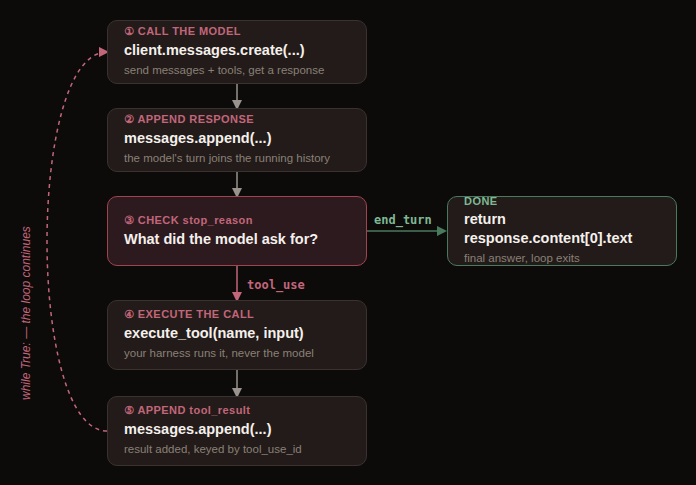
Two categories worth knowing apart, since they change what your harness is responsible for. Tools you define yourself — like the equipment search above — are always client-executed: your harness runs the loop exactly as shown. But some providers also offer server-executed tools — a hosted web search or a sandboxed code execution environment are common examples — where the provider’s own infrastructure runs the operation and hands back the result without your harness ever touching the loop above. You enable the tool in your request and read the finished answer; there’s no execute_tool function to write for those, because there’s nothing for your harness to execute.
The same shape everywhere, different field names
This isn’t an Anthropic-specific pattern — it’s the industry-standard shape for connecting a model to the outside world, and OpenAI’s function calling works through the same five conceptual steps: send a request naming the available tools, get back a structured call, execute it in your own harness, send the output back, get a final response. The field names differ — OpenAI’s model returns a call_id and arguments, and your harness responds with a function_call_output message rather than a tool_result block — but the mechanism underneath is identical in every way that matters. Learn one provider’s tool-calling loop well and the others are a vocabulary lookup, not a new concept.
Every provider’s tool-calling API is the same idea wearing a different set of field names. Learn the shape once.
Why this is the real unlock
The gap between “AI that answers questions” and “AI that gets work done” is entirely this mechanism. A chatbot that can only describe how to look something up is a novelty — genuinely impressive prose, zero effect on the world. A system that can actually look it up, cross-reference it against something else, and act on what it finds is a colleague. Everything else in this series — the agentic CLI tools from the last post, the multi-agent systems and MCP servers covered later on, the skills a model can be handed — is really just different ways of organizing and scaling this one idea. Give the model a way to act, describe that way clearly, and mean it when your harness decides whether to comply.
Where to go if you want the real thing
- Tool use with Claude — overview — Anthropic’s primary documentation for defining and using tools with Claude.
- How tool use works — the exact mechanics of the agentic loop,
stop_reasonvalues, and the distinction between client- and server-executed tools referenced above. - Function calling — OpenAI API — OpenAI’s own guide to the equivalent mechanism, useful for seeing the same idea in different vocabulary.
- “Function calling using LLMs” — Martin Fowler’s plain-language walkthrough of the whole mechanism for readers who want the concept explained without an SDK open in front of them.
Text was never the point
It’s tempting to think of the chat window as the product and tools as an add-on bolted to the side. It’s the other way around. The conversation is just the interface a model happens to use to tell you, and increasingly to tell your own harness, what it wants to do next. The actual product — the thing that makes any of this worth building a business or a workflow around — is the doing. A model that can only talk was always a demo. One that can act, safely, inside boundaries you set yourself, is a tool in the fullest sense of the word: something you pick up because it does real work.